If you track your email campaigns, you can use this simple segmentation model to better approach your recipients, create more relevant message content and, consequently, improve the performance. This model is not better than any other model based on the recipients' interests, preferences, occupation, gender…
How to Know your Inbox Placement and see Spam Filter report Before Sending Real Email Campaign to Detect Potential Delivery Issues
Email marketers now need additional insight as to what mailbox providers do after they accept your email. Aside from measuring engagement metrics, marketers need tools to determine how their message is treated by major Internet providers around the world and whether it is delivered to the Inbox, spam folder or blocked before reaching the recipient’s mailbox.
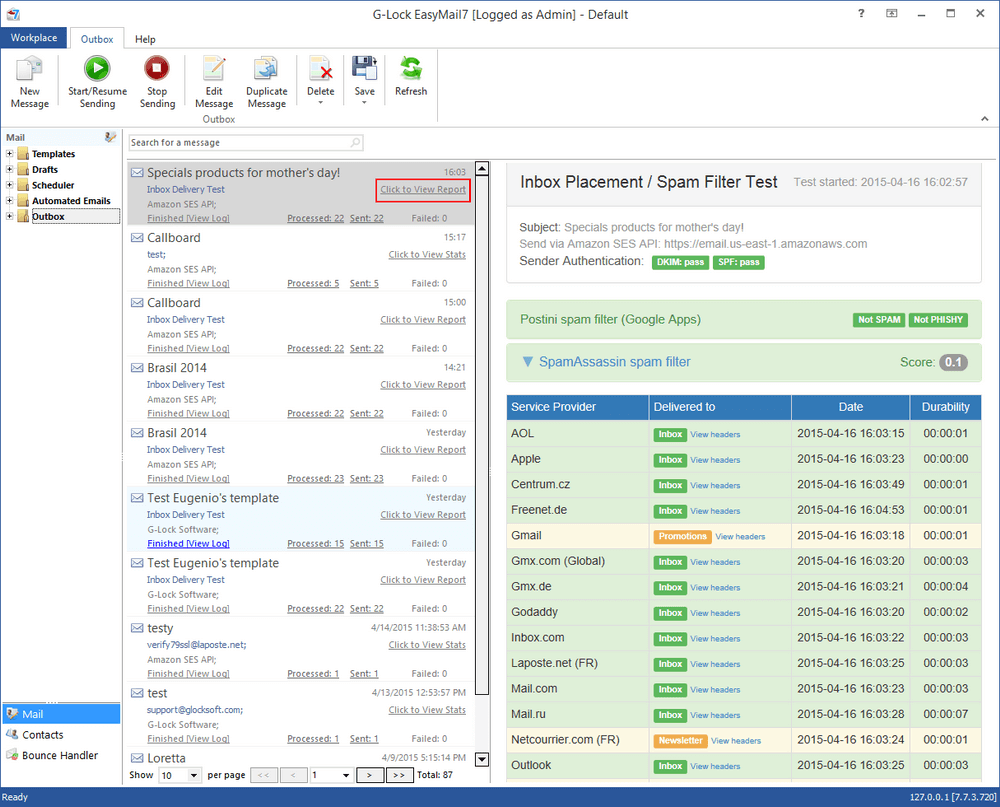
EasyMail7 Inbox Placement/Spam Filters Report provides this valuable information so you have confidence that your email is reaching your customer. Plus you will see in which Gmail tab your message is delivered to.
Watch this short video to learn how easily you can run an Inbox Placement and Spam Filtering test of your HTML email newsletter with EasyMail7 email newsletter system.
What is a Seed List?
In order to run a truly accurate Inbox placement report we send your message to a group of our test email addresses commonly referred to as a "Seed List".
Our seed list includes email accounts with most popular providers around the world such as aol.com, yahoo.com, yahoo.ca, hotmail.com, gmail.com, gmx.com, gmx.de, outlook.com, icloud.com, GoDaddy, mail.ru, yandex.ru, Apple and growing.
What Does the Delivery Test Report Show?
After sending your email to our seed list, the delivery test report will be generated just within a few minutes. You can view it in the Outbox.
Your delivery report presents:
sender authentication test: DKIM and SPF;
Postini spam filter test: spam/not spam, phishy/not phishy;
SpamAssassin test: email spam score;
message placement at different providers: Inbox, Spam, Newsletters or x if your email was blocked and did not reach the mailbox. At Gmail the report will show if your email was delivered to the Primary, Social or Promotions tab.
delivery duration;
full header of the received message.
Why Test Email Placement and Sender Authentication?
The primary reason why you'll want to run an Inbox placement test is to verify that your email newsletters are reaching the recipient and not marked as spam or blocked. The Inbox placement test is a great opportunity to investigate how your message is treated by major email providers and solve deliverability problems in advance.
You may be thinking that you are sending great campaigns but in reality it may be the opposite. If one day you find out that your email open rate is much lower than it is used to be, or you get complaints from your subscribers that they are not receiving your emails, it's a sign that something is wrong with your email program. This is when you should take an extra step and send a delivery test. If any issues are revealed, take time to fix them before your next campaign.
A regular testing of the Inbox placement allows you to monitor your sender reputation with different email service providers and make sure that you are in good standing with top domains on your list.
How Many Delivery Tests Can You Send?
To protect the performance of our system we do have a fair-usage policy of 3 free email placement tests for the trial license, 30 free email placement tests for the Personal license and 150 free email placement tests for the Business license.
If you reached this level and need more tests, you can buy additional test credits directly from the program.
Tags: Test Email Before Sending

The Secrets I Know
| #
Thanks for these! I have bought your Fast blog finder software and I’m using it now as well as the Fast Directory submitter. Great products!