In this article I will tell you about a particular EasyMail7's feature that is often overlooked but may help you avoid email delivery issues arising from a specific SMTP server configuration. What I mean is the capability to stop and resume email delivery without the…
How to Use Free SMTP Servers in EasyMail7
Using an SMTP server to send emails is faster and more reliable because the emails sent through the SMTP server have more chances to be delivered into the Inbox. If your ISP SMTP server is able to handle many messages at a time and does not impose strict email sending restrictions, you can use your ISP SMTP settings in EasyMail7.
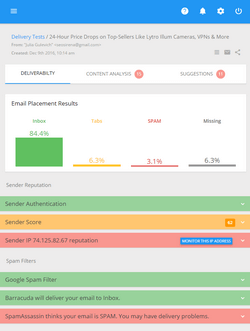
You can use G-Lock Apps delivery and spam testing tools to test your Inbox placement with major ISPs around the world including Yahoo, AOL, Hotmail and Gmail. You’ll also get your email spam scores, authentication issues, and daily blacklist monitoring to check if your server’s IP address is blacklisted or not.
To setup an outgoing mail account in EasyMail7 email marketing system:
1. Open EasyMail7 and login.
2. Go to Workplace -> Outgoing Mail Accounts.
3. Click on “Add New”.
4. Type the account name and enter the sender information.
5. Click on the Delivery Options tab.
6. Select “Send via SMTP server” delivery mode.
7. Enter the name of the SMTP server and the port number.
8. If the SMTP server requires authentication, check “My server requires authentication” option and enter your Login and Password.
9. If the SMTP server requires a secure connection, enable the SSL protocol (STARTTLS or SSL).
These parameters are used in your email client software, therefore you can simply “copy” them from a working email account in your email client and enter them in the Account settings in EasyMail7.
If you have an account with free email service providers, you can use their SMTP settings in EasyMail7 too.
Below you’ll find how to use Gmail, Yahoo!Mail, MSN/Hotmail, AOL, Lycos and GoDaddy SMTP Settings in EasyMail7. Plus, they all have different sending policies and restrictions that you need to be aware of.
How to Use Gmail SMTP Settings in EasyMail7
| SMTP Server | smtp.gmail.com |
| Port | 587 |
| My server requires authentication | Yes (checked) |
| Login | your full email address including @gmail.com |
| Password | your password for the Gmail account |
| Security protocol | Use STARTTLS |
To make sure the SMTP settings are correct, click on the Test button.

If the test passes, your SMTP settings are correct.
Click Close and then OK to save the account settings.
Gmail Restrictions: max 500 recipients per message if you are using the Gmail web interface and max 100 recipients if you are using an email marketing software. The restriction is automatically removed in 24 hours after the limit was reached. Here you can read more about Gmail sending policy
How to Use Yahoo!Mail SMTP Settings in EasyMail7
| SMTP Server | smtp.mail.yahoo.com |
| Port | 465 |
| My server requires authentication | Yes (checked) |
| Login | your full email address including @yahoo.com |
| Password | your password for the Yahoo account |
| Security protocol | Server requires secure connection (SSL) |
Yahoo!Mail Restrictions: max 100 emails per hour. Read more about Yahoo Anti-Spam Policy. And here you can read how to comply with the ISP sending restriction using EasyMail7.
How to Use MSN/Hotmail SMTP Settings in EasyMail7
| SMTP Server | smtp.live.com |
| Port | 587 |
| My server requires authentication | Yes (checked) |
| Login | your full email address including @live.com |
| Password | your password for the MSN/Hotmail account |
| Security protocol | Use STARTTLS |
MSN/Hotmail Restrictions: max 100 emails per day.
How to Use AOL SMTP Settings in EasyMail7
| SMTP Server | smtp.aol.com |
| Port | 587 |
| My server requires authentication | Yes (checked) |
| Login | your full email address including @aol.com |
| Password | your password for the AOL account |
| Security protocol | Default (no SSL) or Use STARTTLS |
AOL Restrictions: max 100 recipients per message or max 500 recipients per connection. Read more about AOL Email Policy
How to Use Lycos SMTP Settings in EasyMail7
| SMTP Server | smtp.mail.lycos.com |
| Port | 25 |
| My server requires authentication | Yes (checked) |
| Login | your full email address including @lycos.com |
| Password | your password for the Lycos account |
| Security protocol | Server requires secure connection (SSL) |
Lycos Restrictions: max 25 recipients per message and max 250 emails per day.
How to Use GoDaddy SMTP Settings in EasyMail7
| SMTP Server | smtpout.europe.secureserver.net |
| Port | 25, 80, 3535, 587 (without SSL) or 465 (with SSL) |
| My server requires authentication | Yes (checked) |
| Login | your full email address |
| Password | your password |
| Security protocol | Server requires secure connection (SSL) for the port 465 |
Due to sending restrictions free SMTP servers do not suit for sending marketing emails in high volumes. That’s why if you have an email list that is big and growing, you should think about getting a more powerful SMTP server that allows to send as many email messages as you need. Here you can read about all possible options to get a professional SMTP server for email marketing.
Whatever SMTP server you choose, you can use it in EasyMail7 to send email newsletters to your subscribers.
Tags: aol smtp settings, Free SMTP Servers, gmail smtp settings, msn hotmail smtp settings, yahoo smtp settings